What
What is an apex domain?
When you buy a domain, the naked domain name is called the apex domain. It is the root from which subdomains are added. For example, if you buy domainname.com, that is the apex domain. Subdomains like blog.domainname.com are added on top of it.
Sooner or later you will want to connect the apex domain itself to a site, not just a subdomain. That is where you will run into an issue. This post shows you how to fix it.
Why
When you have a domain and a site ready to serve, you need to point the DNS to your server. For a single server with a fixed IP, you put the IP into an A record for the domain and you are done.
But what if you are behind a CloudFront distribution, a load balancer, or S3 static hosting? Any of those gives you a domain name, not a single IP. You will want to add a CNAME. The problem: DNS does not allow a CNAME on the apex domain. You are stuck.
How
Different registrars offer different ways to handle this.
Add Web Redirects
Some registrars let you add a web redirect record in their DNS settings. In the background, they run a proxy that redirects requests from the apex domain to your target domain.
You can do this manually with your own proxy server, but that means running a server just to redirect traffic. Web redirect records make this easy without extra infrastructure.
Note: you may run into certificate issues with this approach depending on the registrar.
Using Route 53 with S3
If you are using AWS Route 53, you can create an alias A record pointing to an S3 bucket.
Create an S3 bucket with the same name as your apex domain. Make it public and enable static website hosting on it.

Set the hosting type to Redirect requests for an object and point it at your target.
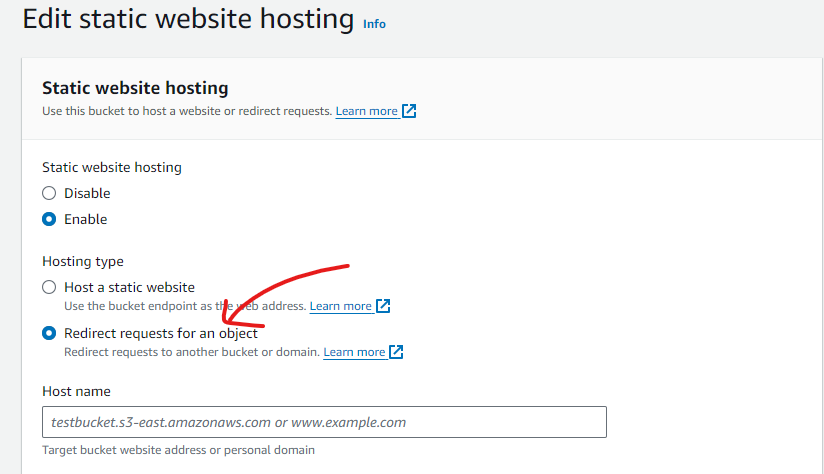
Now go to Route 53 and set this S3 bucket as the alias target for the A record on the apex domain.
Go test it. Works on HTTP, right?
Now try with HTTPS. That fails. The S3 redirect approach only works with HTTP, not HTTPS. For HTTPS you need to go one step further.
Using CloudFront
To support HTTPS, point the apex domain at a CloudFront distribution instead of directly at S3.
Set up a CloudFront distribution for the site you want to serve. Then in Route 53, create an alias A record for the apex domain pointing at the CloudFront domain instead of the S3 bucket. That is it.
Wait for DNS to propagate, then test. Both HTTP and HTTPS will work correctly.
Thoughts
There are multiple ways to solve this. The right approach depends on what you are trying to achieve. The goal in all cases is to redirect all four variants to a single target:
http://domainname.com
https://domainname.com
http://www.domainname.com
https://www.domainname.com
As long as you can achieve this with minimal extra infrastructure, you are good.